For one message you want to keep, save it in the form your mail program gives you, and add a PDF if someone needs to read or print it. From Gmail that is an EML file. From Outlook on the web it is an EML or an MSG file, and from Outlook for Windows it is an MSG file. For a whole folder or a few years of mail, keep an MBOX file or a PST file. Whatever you pick, keep attachments in their original format as well.
The five formats side by side
| Format | What it holds | Where it comes from | Opens in | Weak point |
|---|---|---|---|---|
| EML | One message | Gmail (“Download message”), Outlook on the web and Outlook.com | Desktop mail programs, and browser viewers | Attachments make the file about 37 percent bigger than they were |
| MSG | One item: a message, an appointment, a contact or a task | Outlook | Outlook, and viewers built for it | Tied to Outlook |
| A fixed copy of how one message looked when printed | Print to PDF from a mail program or a browser | Any PDF reader | Not a mail format. You cannot load it back into a mail program | |
| MBOX | Many messages of one folder, one after another in a text file | Google Takeout, and some mail programs | Mail programs that import it, and browser viewers | No list of its messages, and several versions that do not always agree |
| PST | Many folders, with mail, contacts and calendar items | Outlook | Outlook, and viewers built for it | Large files, with a size limit set by Outlook |
EML
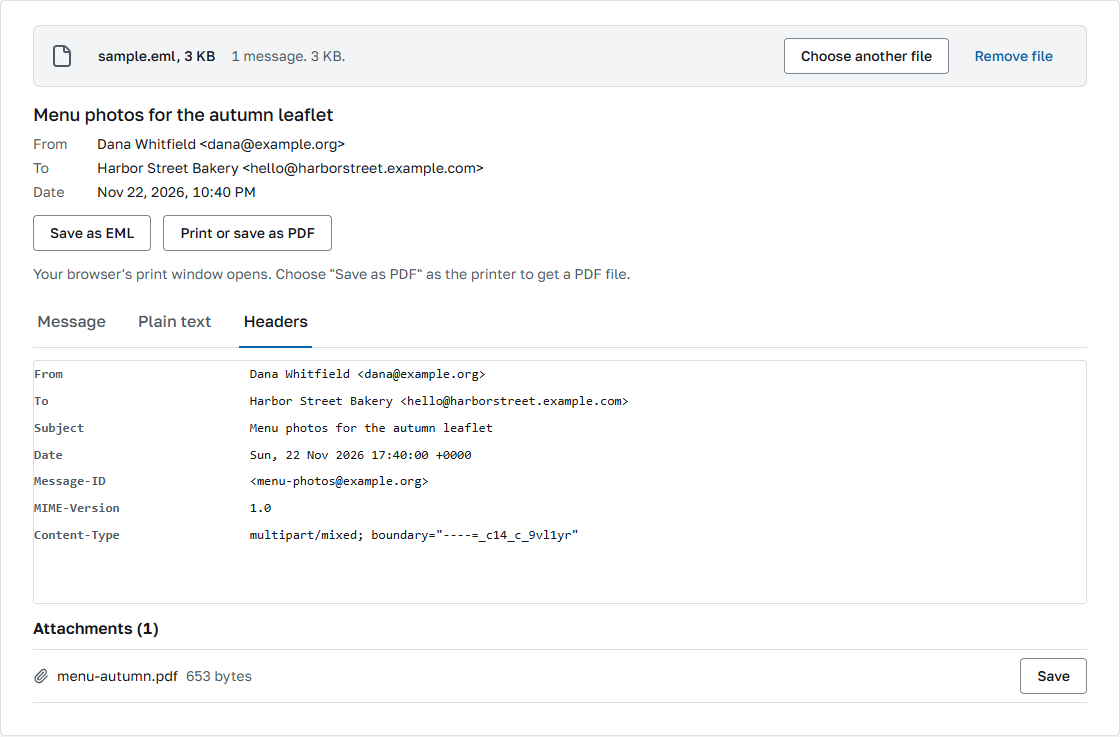
An EML file holds one message in the Internet Message Format, which RFC 5322 defines (it is a Standards Track document). It is plain text: the headers first (who, to whom, when, the route), then the body, then the attachments written out as text.
Gmail’s help page on downloading emails says the file you get from More, then Download message is an EML file, and that you need a desktop mail client to open it. Microsoft’s page on saving an Outlook message as a file says Outlook on the web and Outlook.com save a message as an EML or an MSG file through More actions, then Download.
MSG
An MSG file is Outlook’s own format for a single item. Microsoft publishes it as MS-OXMSG, which says it is used to represent individual email messages, appointments, contacts, tasks and other items in the file system. The published version we read is revision 18.0 of May 20, 2025. Because it is a format for any Outlook item, an MSG file can be an appointment and not a message at all.
A PDF made by printing is a fixed copy of how the message looked on the page. Everyone can read it and it looks the same everywhere. That is also its limit: it has no folders, no way to sort by sender and no way back into a mail program. A PDF made by printing usually does not carry the attachments, so keep them as separate files.
MBOX
The Library of Congress describes MBOX as a family of related formats. They store all the messages of one folder, not a whole mailbox, in a single file. Each message begins with a separator line. The Library lists four variants (MBOXO, MBOXRD, MBOXCL and MBOXCL2) and warns that the variants and the tools for them are not always compatible with each other.
RFC 4155 is the nearest thing to a written definition. It is only an informational memo, and says it does not specify an Internet standard of any kind. Google Takeout gives you Gmail in this format, as the guide on Gmail downloads explains.
PST
A PST file is the Outlook data file. It holds the folder tree with mail and also contacts, calendar items and tasks. Outlook caps its size, as the post on the maximum size error shows.
What the Library of Congress lists
The Library’s Recommended Formats Statement has a section on email, which we read on November 29, 2026 (Recommended Formats Statement, email). It says three things.
- There is no preferred format for email messages at this time. The Library says it is still building its capacity for email archiving.
- Acceptable for single messages: EML, MSG and PDF.
- Acceptable for groups of messages, such as a whole inbox or folder: PST (Unicode and ANSI), MBOX and PDF.
It also says attachments and embedded data should remain in their original format, and that files must carry no encryption or access control that stops use.
That statement describes what one library accepts for its own collections. It is not a rule for you. It is a useful outside check, because it names the same five formats. It also fits the advice above: one message in the form your program gives you, MBOX or PST for a group, and the attachments kept as they were.
A sum for file size
EML stores an attachment as text, using an encoding called Base64, so it takes more room than the original file. RFC 2045 describes Base64 and says it makes data about 33 percent larger, and that lines must not be longer than 76 characters. Every group of 3 bytes becomes 4 characters, and every 76 characters get a line break of 2 more. So the factor is 4 over 3, times 78 over 76, which is about 1.368.
We checked that with this site’s own EML writer, on made-up data. A message with a 3,000,000 byte attachment came out as an EML file of about 4.1 MB (4,105,787 bytes in our run), which is 36.9 percent more. A 30,000,000 byte attachment gave about 41 MB, 36.8 percent more. The exact count shifts by a few bytes from run to run, because each file gets its own random separator.
Now plan with it. Take 2,000 messages, each with one 3 MB attachment. The attachments alone are 6 GB. As EML files they come to about 8.2 GB. If your disk is nearly full, count on that.
Which one for which job
- Keeping one important message. Save it as your program gives it: EML from Gmail, MSG from Outlook for Windows, either from Outlook on the web. Make a PDF of it too, so you can read it on any device. To make a PDF, print the message and choose a PDF printer, such as Microsoft Print to PDF, or choose “Save as PDF” in your browser’s print window. Keep any attachment as its own file.
- Sending a message to someone who has no mail program. Send the PDF.
- Keeping a whole mailbox that came out of Outlook. Keep the PST. Do not convert it to something else for its own sake.
- Keeping a whole mailbox from Gmail. Keep the MBOX file from Takeout.
- Moving between mail programs. Use the formats the two programs share. Check their help pages, and test with a few messages before you move thousands.
- Before you delete the original mail. Open a few of the saved files, in a different program if you can, and keep a second copy of the saved files in another place.
- Using mail as evidence. Ask a lawyer or your records office first. This post is not advice for that.
What this site writes, and what it leaves out
The EML viewer, the MSG viewer and the other viewers on this site read the file on your device and upload nothing.
When you save a message as EML, what you get depends on where it came from:
- From an EML file, the page saves the message exactly as the file holds it.
- From an MBOX file, the page saves the message as it was stored, except that the “From” separator line that MBOX puts in front of every message is removed.
- From an MSG or PST file, the page writes a new EML file from what it read: sender, recipients, date, subject, Message-ID (the message’s own number), the text, the formatted text and the attachments. It writes no other header from the original. The Received lines, which show the route the message took, are not in the file. Nor are the In-Reply-To and References lines, which tie a reply to its conversation. The time is written in UTC, so the sender’s own time zone is lost.
So the EML from a PST or MSG file is a copy, not the original. If the exact original matters, keep the PST or MSG file too.
Sources
All pages were read on November 29, 2026.
- Library of Congress, Recommended Formats Statement: Email
- Library of Congress, MBOX Email Format
- Microsoft Learn, [MS-OXMSG]: Outlook Item (.msg) File Format
- Microsoft Support, Save an Outlook message as a .eml file, a PDF file, or as a draft
- Gmail Help, Download & send emails as attachments
- IETF, RFC 5322, Internet Message Format (Standards Track, October 2008)
- IETF, RFC 4155, The application/mbox Media Type (Informational, September 2005)
- IETF, RFC 2045, MIME Part One
- The size test: this site’s EML writer, run on November 29, 2026 with made-up data (recorded in the engine test note).
This site is not connected with Microsoft or Google. Outlook and Gmail are their names, used here to say which files this page is about.